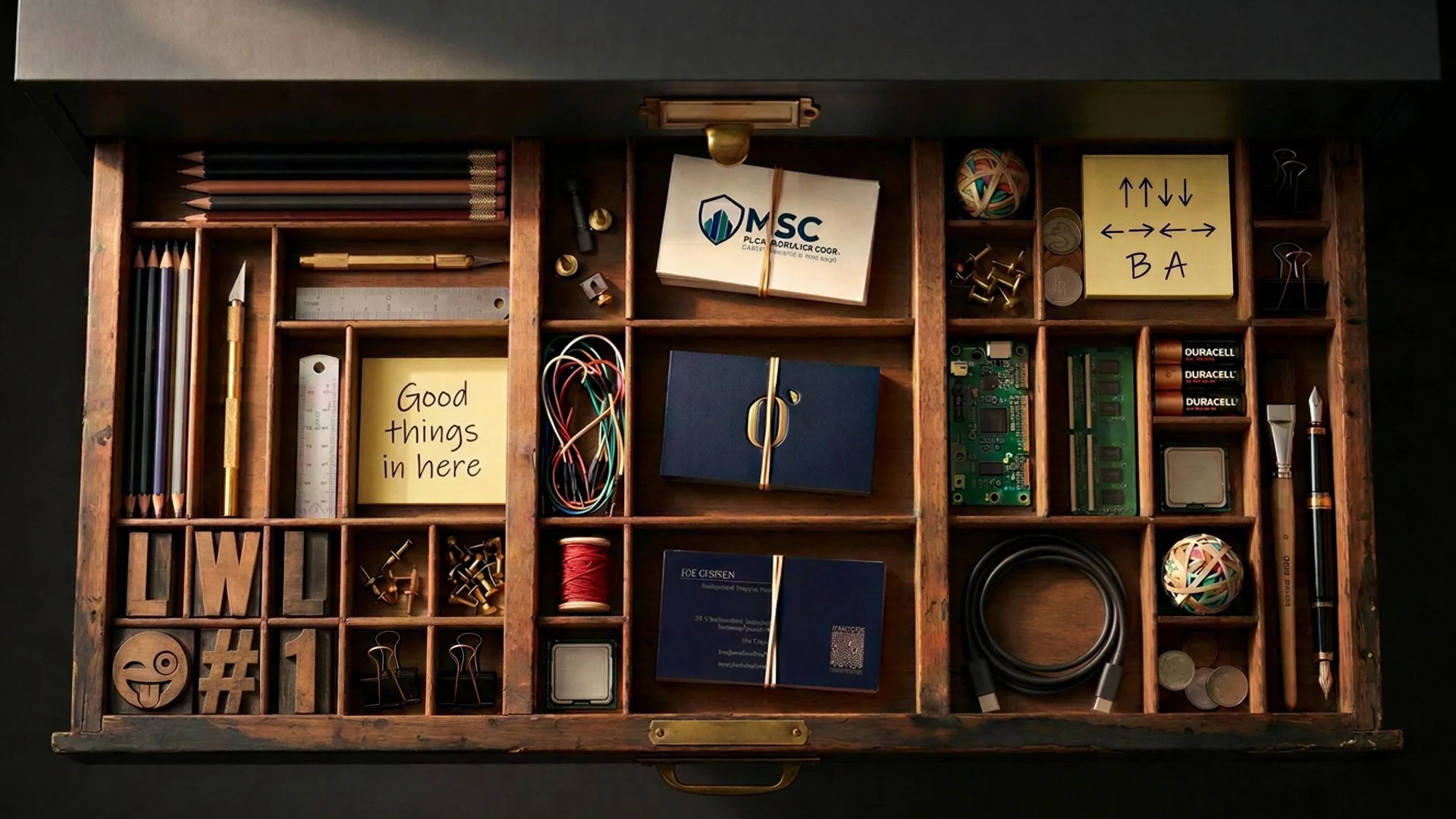
Overhead view of a vintage letterpress type drawer pulled from a dark cabinet, filled with pencils, wires, RAM, a circuit board, client business cards and sticky notes

Everything in between.

RAG · agentic AI · generative AI · automation

The tools, AI systems and agents I built when nothing on the market did the job, so the client work could move faster and scale.

See the tools
What’s in the drawer

Six tools. One builder.

Each one replaced a recurring headache with a system. Here’s what they do and what changed, shown through the interface, never the source.

01 — Data extraction

Web scraper

Crawls any website into a complete, searchable record.

  • Web scraping
  • Playwright
  • Headless browser
  • Data extraction
  • Site architecture
Built for
Client content + site work
Replaces
Copy-paste, screenshots + paid crawlers
Status
In daily use
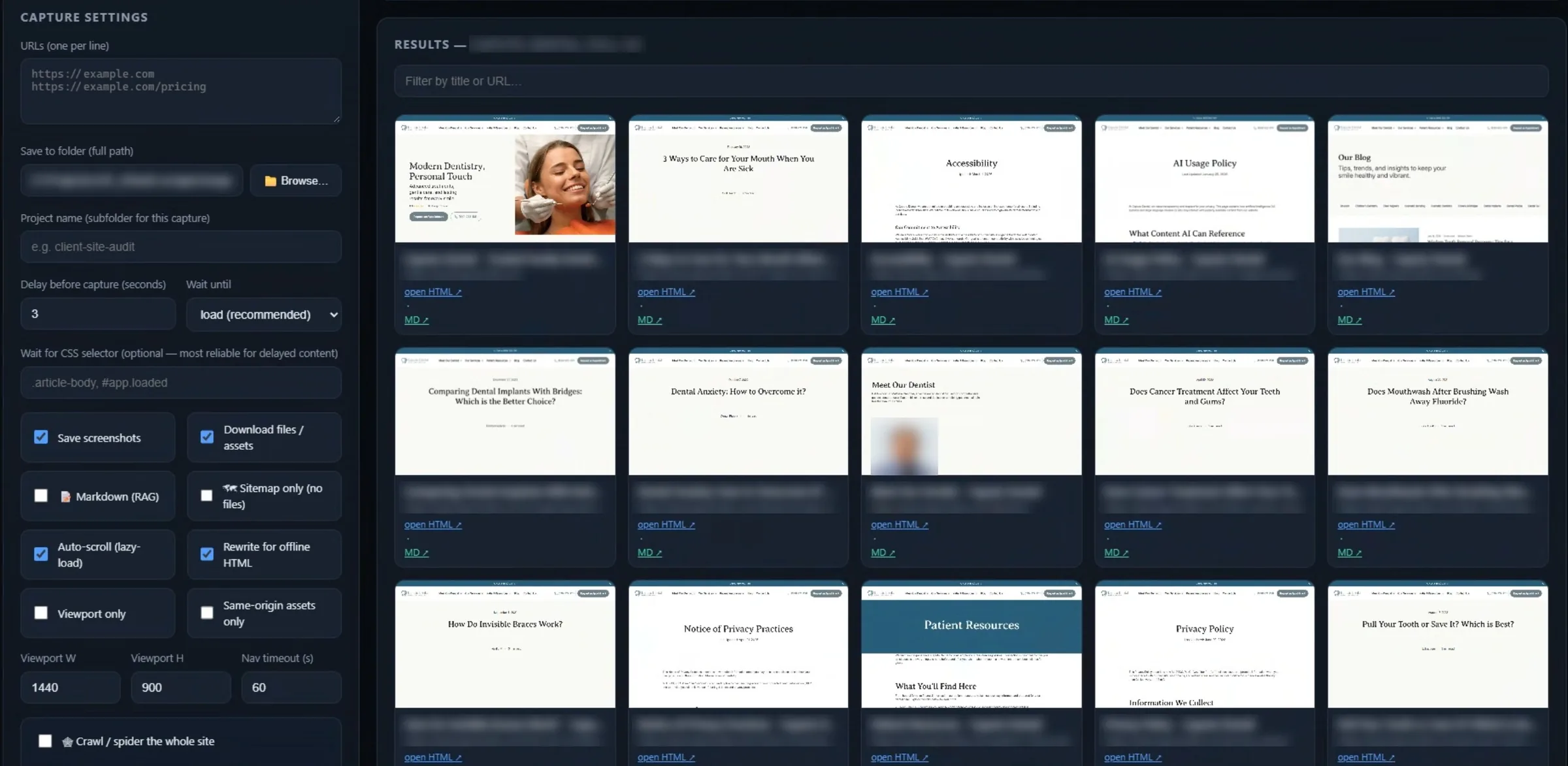
Web scraper interface: capture settings on the left, a grid of captured pages with screenshots and HTML and Markdown links on the right
Web scraper · interface

Every content project used to start the same way: clicking through a client’s site page by page, copying text and saving images one at a time.

Free tools only got me part of the way: a page here, some text there, images left behind. Paid tools did the whole job, but it was a job I could build myself. So why pay for it?

So I built a scraper that crawls the whole site in a single pass. It snapshots every page, pulls down every image and every line of copy, and links all the pages together, so the result works as an active archive you can click through, mapped to the site’s real structure.

That local copy becomes the reference point for everything that follows. I can check what a page said before the rewrite, pull an asset without chasing the client for it, and feed the entire site straight into my competitive analysis.

Under the hood
Real browser engine
Built on Playwright, so JavaScript-heavy sites, lazy-loaded images and pop-ups render exactly as a visitor sees them.
Human-paced crawling
It scrolls, waits for content to load and varies its timing like a real visitor, so sites that turn away bots still load cleanly.
Three formats per page
A full-page screenshot, the raw HTML and clean Markdown, ready for AI analysis.
Self-linking archive
Internal links are rewritten to point at the local copy, which turns a folder of files into a site you can click through.
What’s inside
  • Full-page snapshots
  • Every image, downloaded
  • Every page linked: a clickable archive
  • URL and site-structure map
  • Dated local snapshots
Result271 pages, captured in one pass.
02 — LLM analysis

AI competitive analysis

LLM-powered analysis of a client against the field.

  • LLM analysis
  • Claude skills
  • SEO
  • Content gap analysis
Built for
Strategy + SEO work
Replaces
Weeks of manual audits
Status
In daily use
01
In
Full scrape
21 sites
1 client + 20 competitors
271 client pages crawled
02
Cross-referenced
Every site, every lens
ReviewsLogosBrand + typeColor + CTAsServicesStaffContent depthKeyword gapsBlog auditSEOMigrationStrategy
03
Out
A plan, not a pile
  • Content gap map
  • 12-month blog calendar
  • SEO standards
  • 301 migration plan
  • 90-day action plan
Service coverage · client vs. top 5
ImplantsInvisalignVeneersGum diseaseRoot canalEmergencySleep apneaPediatricOrthodontics
Client
Comp. A
Comp. B
Comp. C
Comp. D
Comp. E
CoveredNot foundClient gap
Service page depth · avg words
Comp. A2,079
Comp. D1,414
Comp. C1,096
Client420
Target 1,000+
The finding: the 2nd-largest blog in the market, but service pages a third as deep as the leaders. Rebalance toward the pages patients read before they book.
Anatomy of a real report · client and competitors anonymized

Competitive audits used to mean days of reading rival sites and building spreadsheets that were out of date by the time they were finished.

This is a set of LLM-powered analysis and reporting skills, built on Claude, that measure a client’s site against its competitors, at two depths. For a quick read, it takes a fast snapshot of each site and reports how they position themselves. For the full picture, it runs on content from the scraper, so every page of every site is indexed and searchable.

With the whole field indexed, I can cross-reference anything, anytime: the topics competitors own that the client doesn’t, where messaging overlaps, which services are underexplained and where the openings are. Those gaps turn directly into a content strategy and a prioritized plan, backed by evidence.

Under the hood
Packaged as Claude skills
Every audit follows the same documented method and report structure, not a one-off prompt.
Two depths
A quick read of live sites, or a full audit that runs on the scraper’s Markdown, with every page of every site indexed.
Chained tools
The scraper feeds the index, the index feeds the analysis, and the analysis feeds the report.
Evidence, not opinion
Topics, messaging and services are compared across the whole field at once, so every gap is backed by what the sites actually say.
What’s inside
  • Quick snapshot or full-depth audit
  • Cross-site content index
  • Content gap analysis
  • Strategy and priorities out
Result21 sites in. One 90-day plan out.
03 — RAG

RAG knowledge base

Answers from a client’s own files, every source cited.

  • RAG
  • Ingestion pipeline
  • Retrieval
  • Source citations
  • Data governance
  • Human-in-the-loop
Built for
Agency clients
Replaces
Digging through old decks
Status
In daily use
01
Sources
Client files
  • Sales decks
  • Spreadsheets
  • PDFs + docs
  • Image assets
02Built by me
Intake engine
Ingestion pipeline
  • Convert to clean text
  • Verify against original
  • Extract fact cards
  • Quality check every card
03
Evidence layer
System of record
  • Master manifest
  • Controlled theme tags
  • Flag register
  • Source locators
04
Query layer
Plain-language Q&A
  • Retrieval sweeps
  • Cited answers
  • Flags surfaced inline
  • Brief or full ledger
Human sign-off. A person approves every card before it enters the index.
Receipts, not recallAbsence is an answerFlags travel with the content
RAG knowledge base · how it works

Every client has hundreds of files: sales decks, spreadsheets, research, brand guidelines, product docs. Most of what they know is buried in formats nobody has time to reread.

This retrieval-augmented generation (RAG) system turns that pile into a structured knowledge base. The core is an intake engine I built from scratch. It converts every deck, spreadsheet, PDF and document to clean text, verifies the conversion against the original, then breaks each file into structured fact cards: every claim, figure, quote and price on its own line, traced to the exact slide, page or row it came from. Each card passes a quality check before the next file is opened.

Those cards are tagged against a fixed set of themes and indexed for retrieval. Teams ask questions in plain language, retrieval pulls the exact evidence, and answers come back like a senior strategist who has read everything, with a citation behind every fact.

It’s built to be trusted. It never answers from memory, and it says so plainly when something isn’t in the files. Outdated, conflicting or unapproved content is flagged, and that flag follows the claim into every answer it touches. A person signs off on everything before it enters the index.

Under the hood
Staged pipeline
Convert, verify against the original, extract fact cards, quality gate, tag, index, retrieve, cite.
Fact-level provenance
Every card knows its source file and its exact slide, page or row.
Flags that travel
Outdated or conflicting content stays flagged in every answer that uses it.
Try the same principles
The Interview the portfolio assistant on my homepage is built the same way: hybrid keyword and vector retrieval, with every answer cited.
What’s inside
  • Custom ingestion pipeline
  • Every fact linked to its source
  • Conflict and quality flags
  • Human sign-off before anything goes live
ResultAnswers with receipts, never guesses.
04 — HTML5 ad automation

Banner Studio

Design one HTML5 banner. Get every size.

  • HTML5 ads
  • React
  • Display advertising
  • Motion design
  • Production automation
Built for
Corporate agency clients
Replaces
Resizing each ad one by one
Status
In daily use
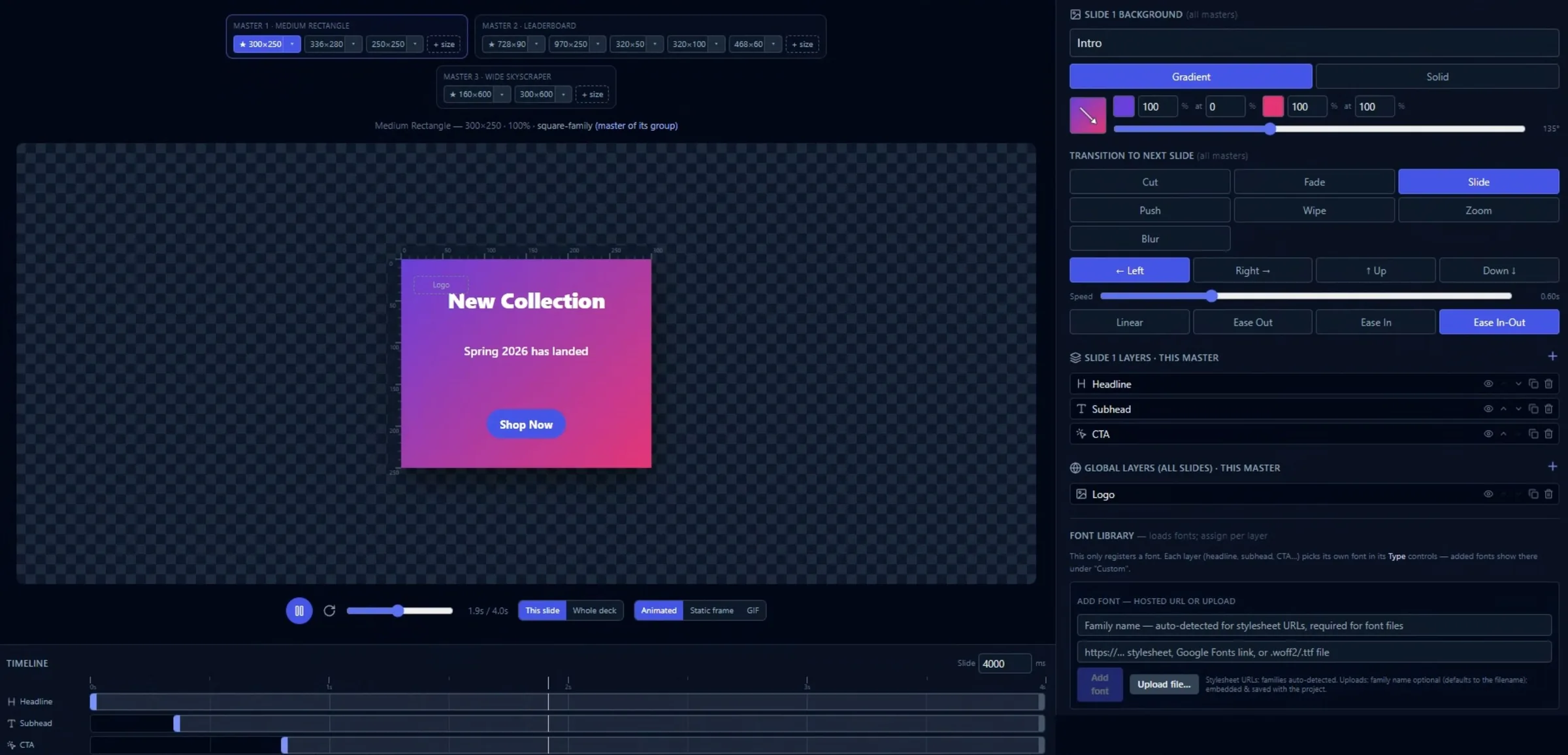
Banner Studio editor: master sizes grouped by ratio across the top, a live banner preview, slide transitions and layers on the right, and an animation timeline below
Banner Studio · interface

The banner tools on the market couldn’t keep up, so every campaign meant rebuilding the same ad in a dozen sizes, then again every time a headline changed.

Banner Studio fixes that. You design once at a standard ratio, and it adapts the layout to every size the media plan calls for. It ships with ten standard sizes, and you can add as many custom ones as a campaign needs. Then you fine-tune only the sizes that need it.

It’s a full production tool, not a resizer. It has layers, a timeline for motion and flexible export, so the same design ships as static images, animated GIFs or HTML5, whatever the channel needs.

Under the hood
Masters by ratio
One master layout per ratio family drives every size in it: a single rectangle master runs 300×250, 336×280 and 250×250. Any size can be fine-tuned, then reverted to its master.
Anchor-based layout
Layers pin to nine anchor points with offsets and percentage widths, so a design reflows to a new size instead of being redrawn.
Built-in motion engine
Multi-slide sequences, transitions, and per-layer entrances and exits with custom easing, all on a timeline.
Exporters written from scratch
Its own GIF encoder (palette reduction, dithering, frame rate, file size shown live), its own ZIP packager, and HTML5 ads with clickTag and embedded fonts, so every ad ships self-contained.
Runs anywhere
One self-contained file built in React: no install, no server. Projects save and reopen as files, with 50 steps of undo.
What’s inside
  • Design at standard ratios
  • 10 presets, unlimited custom sizes
  • Layers and timeline animation
  • Static, GIF or HTML5 export
ResultOne design in, every size out.
05 — Generative AI

AI photography studio

Photoreal generative imagery, without the photo shoot.

  • Generative AI
  • Magnific
  • Image pipelines
  • Prompt engineering
  • Image generation
  • Workflow optimization
Built for
Lone Wolf Labs clients
Replaces
Stock photos and costly shoots
Status
In daily use
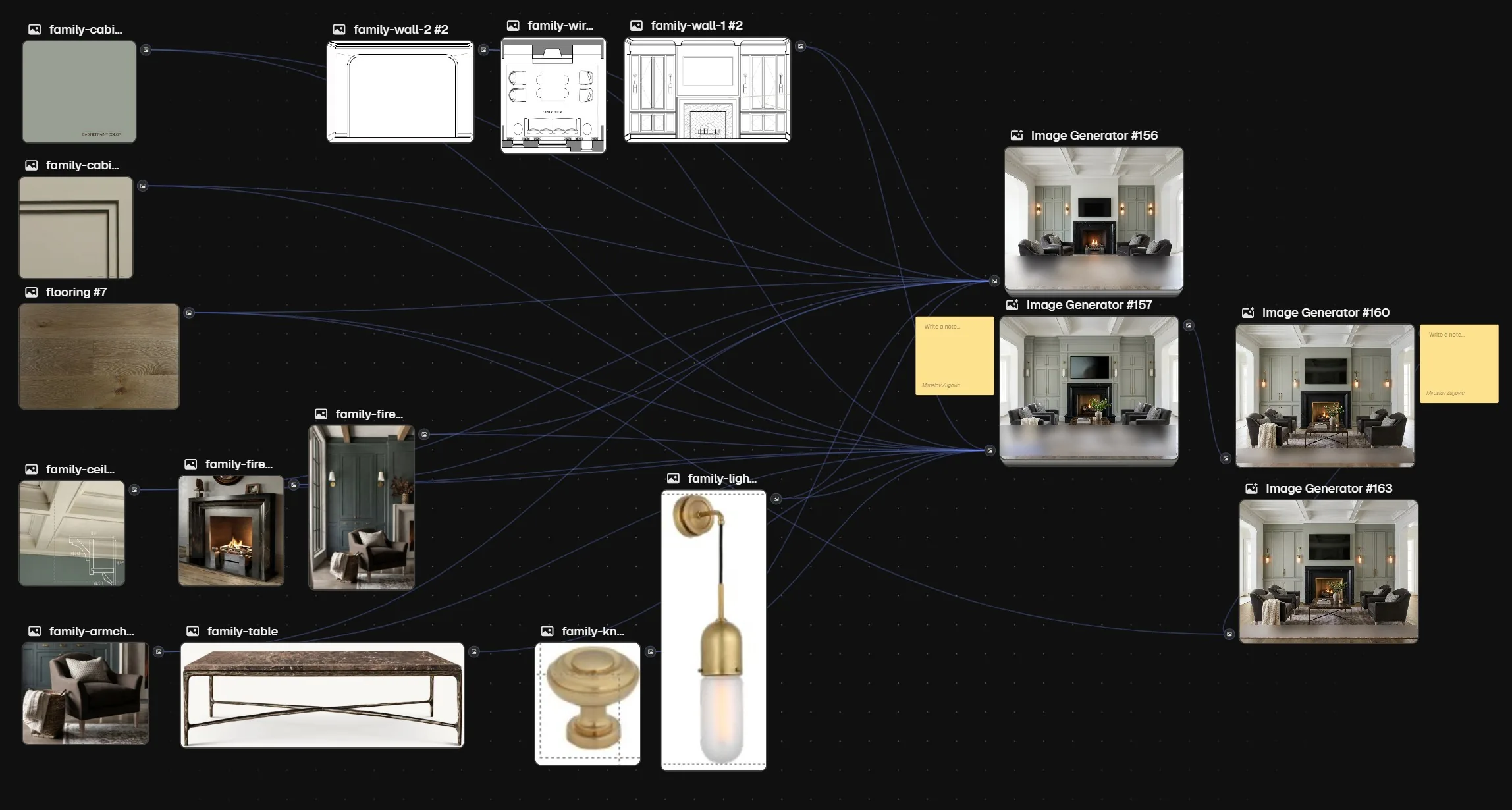
See it in use: real estate renders
Node-based workflow canvas: drawings, finish samples and furniture references wired into image generators that output photoreal renders of a family room
AI photography studio · interface

Small businesses need real-looking photos of their people, food and products. A shoot costs time and money most of them don’t have, and stock never looks like them.

So I developed a set of prompt engineering and workflow methods that produce imagery that reads as real photography: people, food, products and spaces, in any pose, style or setting, matched to the brand and the audience it’s for.

It’s tuned for efficiency as much as quality. Every step is designed to land the shot in fewer attempts, which means fewer wasted renders and less spent on credits. Better images, at a lower cost per image.

Under the hood
Model-agnostic by design
I choose the model for the job, people, food, products or spaces, instead of forcing one model to do everything.
An image-library pipeline
Built on Magnific plus the right models for the work, assembled into an image-library pipeline shaped to each project’s needs.
Real references in
Drawings, finish samples and reference images feed straight into the workflow, so real inputs guide the output, not just words.
Custom-trained when it counts
For Brown Bag BBQ, a ComfyUI workflow and a custom-trained LoRA model locked in the food’s look across all 50 ads.
What’s inside
  • People, food, products and spaces
  • On-brand style control
  • Fewer wasted renders
  • Lower cost per image
ResultShoot-quality imagery at a fraction of the cost and time.
06 — Agentic AI

AI right hand

An agentic AI assistant that plans my day and storyboards my ideas.

  • Agentic AI
  • Claude Agent SDK
  • MCP
  • Human-in-the-loop
  • Extensible architecture
Built for
Me, every day
Replaces
Sticky notes and calendar reminders
Status
In daily use
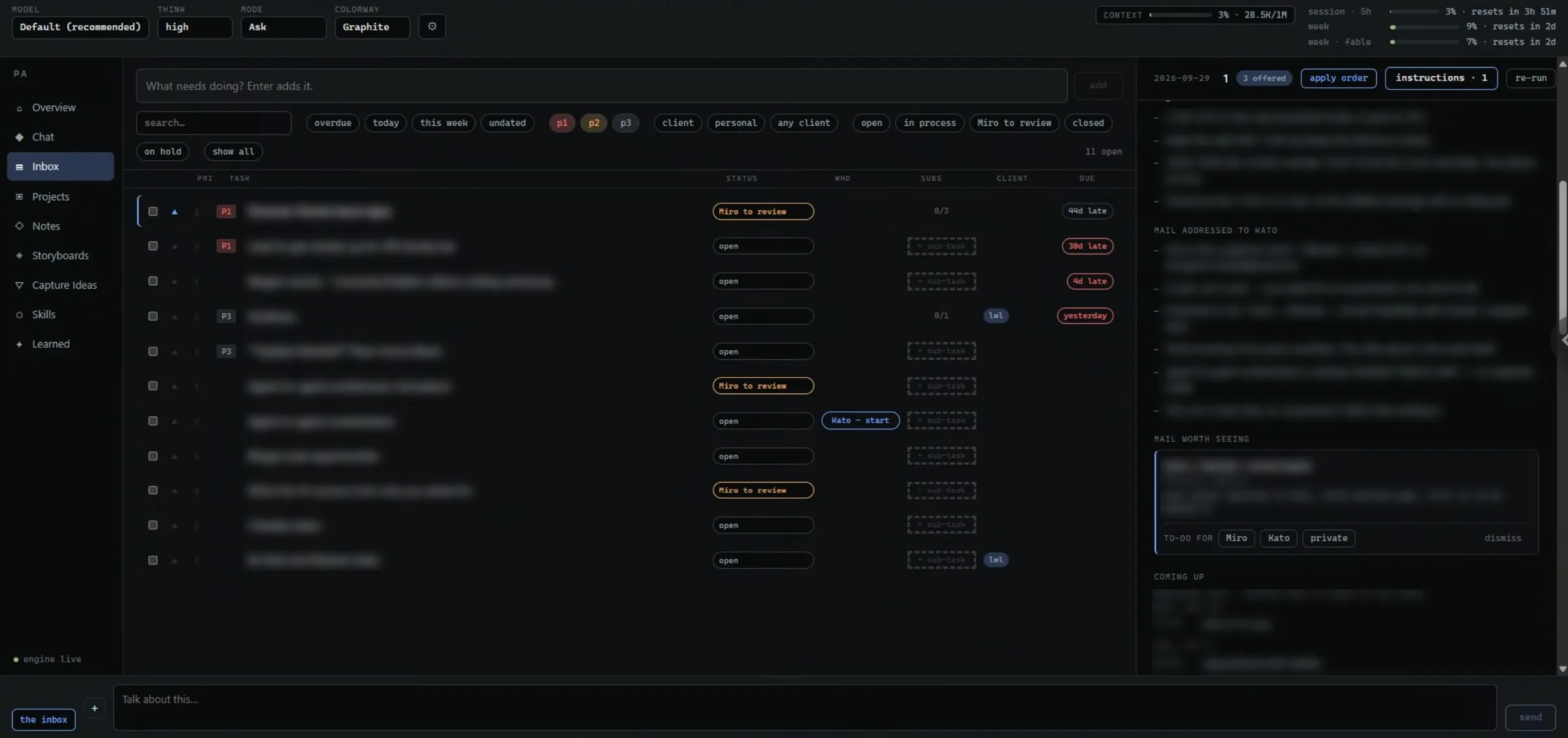
AI right hand inbox: prioritized to-dos with status, sub-tasks and due dates, beside the morning brief panel
AI right hand · interface

A full-time role, my own agency and a constant stream of everything in between. Sticky notes and calendar reminders couldn’t keep up.

So I built an agentic AI assistant around how I actually work. Each morning, before I’m up, it reads my email and calendar and has a brief waiting: what changed since yesterday, a prioritized list for today and replies drafted for me to review. It even volunteers for up to three jobs and does most of the work on them.

It’s one workspace for everything: to-dos sorted by client and priority, a hub for every project that it keeps current, a canvas for mapping notes, and a place to dump ideas and sort them later. Every correction I give it becomes a standing rule, so it gets sharper the longer I use it.

And nothing happens without me. It works overnight in read-only mode, never sends an email on its own and changes my priorities only when I approve them.

Under the hood
Claude Agent SDK + MCP
The agent runs on the Claude Agent SDK, with MCP connectors to email, calendar and image generation.
Permissions by design
Read-only overnight, no outbound email, and priority changes only with my approval.
Memory that compounds
Every correction is stored as a standing rule, so it gets sharper over time.
Plug-in architecture
New models and services connect without a rebuild.
What’s inside
  • Morning brief, ready on wake
  • To-dos by client and priority
  • Prompt-to-storyboard, frame by frame
  • Learns from every correction
ResultEvery day starts with a plan, not a pile.
Why  I build

If the tool doesn’t exist, build it.

Most of these started as a bottleneck: a task done by hand one time too many. Instead of waiting for software to catch up, I built the thing the job actually needed.

None of them are for sale. They’re the in-between work that makes the client work faster, sharper and more consistent, and the reason the projects on this site move as fast as they do.

Up next
The person behind the work